
MailerLite review in one minute
| Decision factor | Assessment | What it means |
|---|---|---|
| Best fit | Creators and small teams | Strong when newsletters and simple follow-up are the main jobs |
| Workflow clarity | Focused and well documented | Core publishing, subscriber and automation tasks follow a coherent operating model |
| Automation | Useful for common journeys | Groups, segments, conditions and several trigger types cover normal welcome and nurture flows |
| Free plan | Good for testing, small for growth | 250 active subscribers and 2,500 emails per 30 days |
| Reporting | Covers campaign and workflow analysis | Campaign, subscriber, link, location and automation activity reports are documented |
| CRM depth | Limited | Use another system for pipelines, service cases and complex account records |
| Overall verdict | Recommended with conditions | Best when email publishing is the centre of the workflow |
Who should choose MailerLite
MailerLite makes the most sense when one person or a small team owns the complete email workflow. The typical job is easy to describe: collect a permission-based signup, deliver a promised resource, send a useful newsletter and follow up according to a small number of actions or interests.
This focus matters. A business does not benefit from paying for a broad customer platform when it primarily needs dependable publishing and a few automations. MailerLite combines those jobs with forms, landing pages, websites and simple commerce features, which can reduce the number of tools required for an early-stage project.
- A creator launching a first newsletter, lead magnet or paid offer.
- A consultant or service business that needs a welcome and enquiry-nurture sequence.
- A small business sending regular updates and promotions to a consented list.
- A publisher that wants forms, landing pages and email in the same interface.
- A lean team that values an understandable operating process over a large marketing suite.
Who should not choose it
MailerLite is not a complete sales operating system. If the team needs deal stages, account ownership, sales forecasting, support tickets and a detailed record of every customer interaction in one place, a dedicated CRM or broader customer platform is likely to fit better.
MailerLite users are not cut off from additional messaging channels. Its sister product MailerSend adds transactional email, SMS and WhatsApp, with connected sign-on that makes the two applications easy to access. The trade-off is architectural: teams that insist on marketing, sales, service and every messaging channel inside one product may still prefer a broader all-in-one platform.
- A sales team that requires pipeline management inside the email platform.
- A service organisation that needs ticketing and account-level case history.
- A team that requires every customer channel and sales record inside one interface rather than a connected product ecosystem.
- A company that needs a highly customised data model or complex enterprise permissions.
- A sender unwilling to authenticate a domain, document consent or maintain list hygiene.
Evidence basis and review scope
This review draws on MailerLite's official pricing, help documentation and published product rules. EmailTonic verified plan names, Free-plan limits, trial conditions, subscriber organisation, automation triggers, reporting and export options against primary sources.
The verdict covers product fit, operating model, documented capabilities, constraints and total-cost considerations. EmailTonic does not publish universal deliverability percentages, support-response claims or synthetic performance scores because those results vary by account, list, content and test conditions.
Operational observations are added only when they can be reproduced through a documented workflow. This keeps factual product analysis separate from measurements that would not generalise reliably to every reader.
Plans and real cost
| Plan | Starting position | Practical interpretation |
|---|---|---|
| Free | $0, up to 250 active subscribers | A learning and validation environment, not a generous growth tier |
| Comfort | From $12 per month | The likely default for a regular newsletter that needs branding removal, more capacity and email support |
| Power | From $25 per month | For frequent sending, unlimited users, larger workflow capacity and multiple automation triggers |
| Enterprise | Custom, for 200,000+ subscribers | A sales-led plan with dedicated support and onboarding |
Why the Free plan is useful but easy to outgrow
The current Free plan permits up to 250 active subscribers and 2,500 emails every 30 days. It also includes two users, three automations, three forms, one landing page, one five-page website and one digital product or booking. That is enough to learn the product and validate one small signup-to-welcome system.
The contact ceiling changes the risk profile. MailerLite states that exceeding 250 active subscribers pauses campaigns and automations and restricts new additions through imports, integrations and the API. Forms can continue to collect signups, so a successful promotion can create subscribers who are waiting for the promised delivery.
Treat roughly 200 active subscribers as a planning signal, not an official limit. Before a launch, decide whether the project will upgrade, slow acquisition or use another platform. The decision should happen before an audience is exposed to a broken welcome experience.
Subscriber organisation is simple once groups and segments are separated
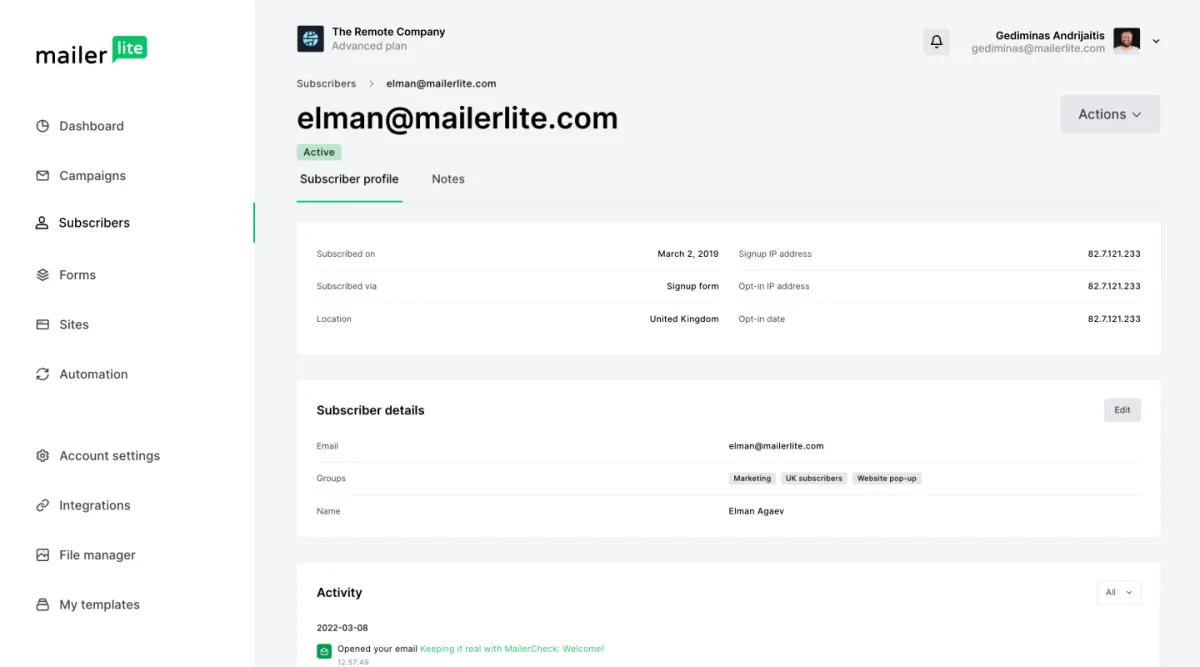
MailerLite uses groups and segments for different jobs. A group is an explicit list that changes when a person, an automation or an integration adds or removes a subscriber. A segment is calculated automatically from rules such as signup date, group membership, campaign activity, fields, purchases or automation status.
A durable setup uses groups for intent and provenance, then segments for behaviour. For example, Newsletter Main and Lead Magnet Pricing Checklist are useful groups. Clicked pricing link in the last 30 days is better represented as a segment because membership should update automatically.
The distinction prevents a common implementation mistake: creating dozens of manual groups that try to reproduce behaviour. Start with a small naming system, record why each group exists and delete only after checking whether a form or automation depends on it.
Automation is capable enough for normal creator and small-business journeys
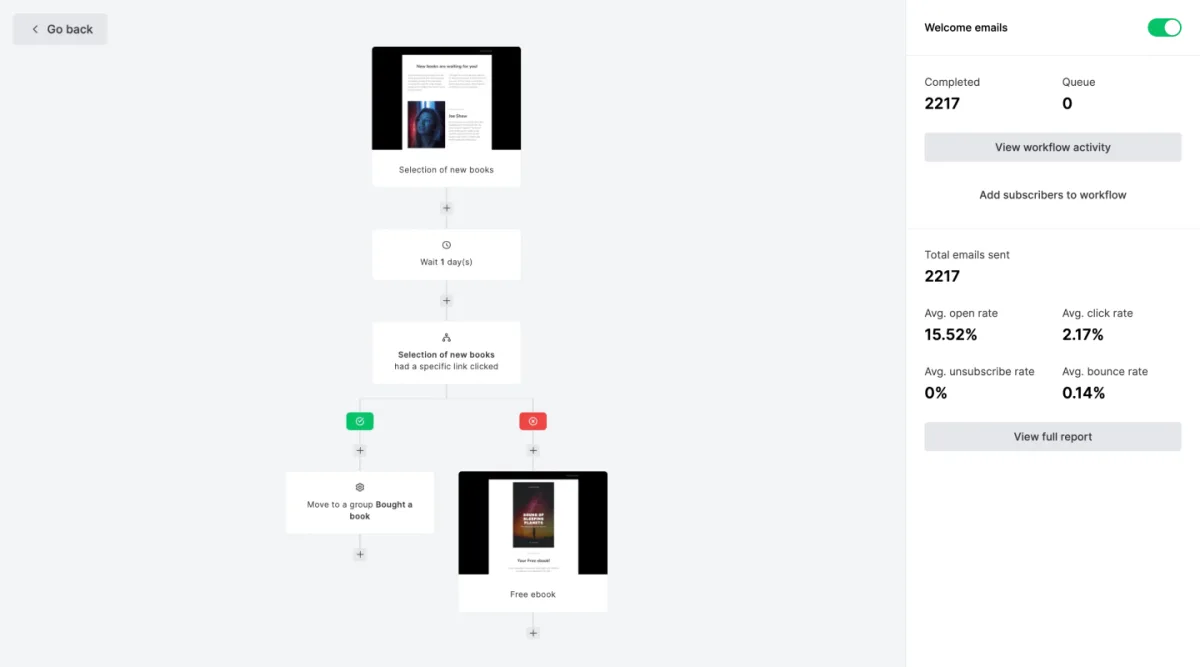
MailerLite documents seven default trigger categories: joining a group, completing a form, clicking a link, updating a field, reaching an anniversary, reaching an exact date and joining a segment. Ecommerce integrations can add purchase-related triggers. Conditions can branch a workflow using fields, groups, segments and other data.
That covers the workflows most small operators actually need: welcome delivery, lead-magnet follow-up, interest-based branching, event reminders, re-engagement and buyer exclusions. Power allows up to three triggers in one automation, while lower tiers use a more constrained model.
The useful question is not whether the builder has many boxes. It is whether another person can understand why a subscriber entered, what happens next and how the subscriber exits. A five-step workflow with clear group names is safer than a complex diagram that nobody audits.
Editors, forms, pages and simple commerce reduce tool sprawl
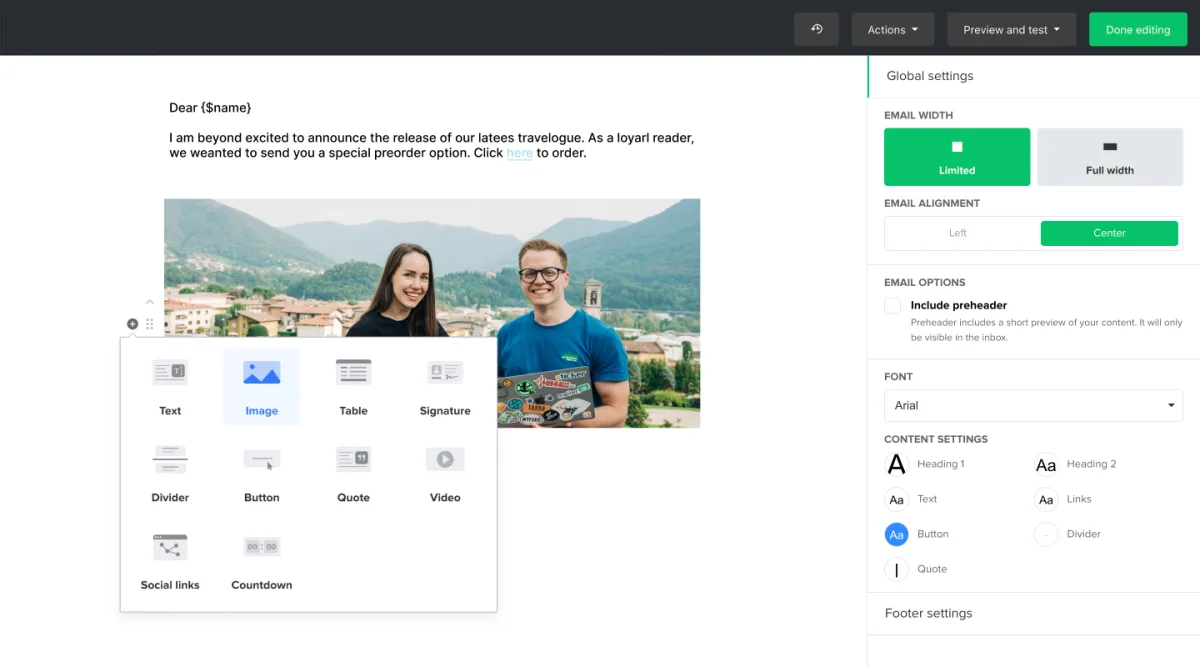
MailerLite includes drag-and-drop, simple and custom HTML email editors. It also combines signup forms, pop-ups, landing pages and a website builder. This breadth is attractive when the alternative is connecting several inexpensive tools that each need consent logic, analytics and maintenance.
The integrated approach is not automatically superior. A specialised website or commerce platform can offer better content management, checkout, tax handling or design control. Use MailerLite's adjacent tools when they make the subscriber journey simpler, not merely because they are included.
For a first lead magnet, one MailerLite landing page can be a sensible choice. For a content-led business with hundreds of pages, keep the main website in a dedicated content system and use MailerLite for the email layer.
Reporting supports practical analysis, but metrics still need interpretation
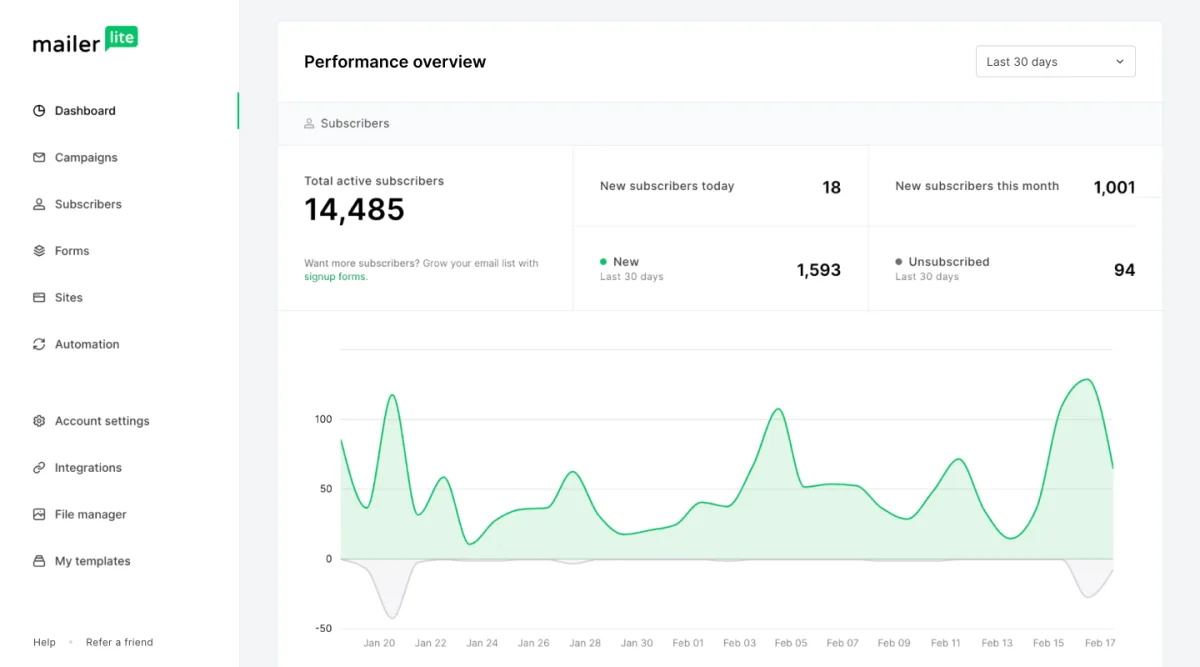
MailerLite documents dashboard reporting across subscribers, campaigns and automations. Campaign reports include overview, subscriber activity, link activity and location data, with additional survey or order reporting when those blocks are used. Automation reports include workflow activity, history and results for individual messages.
Those reports can answer operational questions such as which link attracted qualified interest, where subscribers leave a sequence and whether a campaign produced orders through a connected store. They cannot prove that an open represents genuine attention. Privacy protections and image blocking make open rates directional rather than absolute.
A useful reporting routine should prioritise clicks, replies, form completion, qualified enquiries, purchases, unsubscribes and complaints. Compare campaigns with the same purpose rather than celebrating a single high percentage without context.
Domain authentication and approval are launch requirements
New accounts must provide accurate business information and may need approval before normal sending. MailerLite also provides domain-authentication instructions for SPF and DKIM, plus guidance for DMARC. These controls should be completed well before the planned launch date.
Do not create a second SPF record when the domain already has one. Multiple SPF records can cause authentication failure, so authorised services may need to be merged into one valid record. Verify success inside MailerLite rather than assuming that a visible DNS record is correct.
Authentication does not guarantee inbox placement. List consent, complaint rate, engagement, content and sending consistency remain important. No responsible review should publish a universal deliverability percentage from a small or undocumented test.
Data export reduces lock-in, with one detail to remember
Account administrators can export subscribers as CSV or CSV for Excel. MailerLite also documents exports by group, segment, campaign activity and automation activity. This is important for backups, migrations and independent analysis.
The subscriber export includes the fields visible in the list overview at the time of export. Select the columns required for the backup, including groups when relevant, before generating the file. An export procedure that nobody has tested is not yet a backup strategy.
Schedule periodic exports according to the value and change rate of the list. Keep consent evidence and source data outside the platform when legal or operational requirements demand it.
Three realistic decision scenarios
| Scenario | Likely decision | Reason |
|---|---|---|
| Creator with 120 subscribers, one weekly newsletter and a three-email welcome | Start with Free and plan the upgrade | The workflow fits, but growth can reach the 250-subscriber ceiling quickly |
| Consultancy with 900 active contacts, two monthly campaigns and lead follow-up | Comfort is the likely starting point | Regular sending, branding control and support matter more than unlimited capacity |
| Team with several funnels, frequent sending and multiple operators | Evaluate Power against a broader CRM | MailerLite can scale the email operation, but sales and service requirements may justify another architecture |
How to evaluate MailerLite in 90 minutes
Do not score the product until the complete path works. Record friction, unclear labels, missing controls and the time required to recover from an error. Repeat the same protocol with the closest alternative before migrating a live list.
- Minutes 0 to 15: create the account, record approval requirements and inspect plan status.
- Minutes 15 to 30: authenticate a test domain and document every DNS change.
- Minutes 30 to 45: create one group, one field, one segment and one signup form.
- Minutes 45 to 60: build a three-message welcome automation with a delay and a condition.
- Minutes 60 to 75: create a campaign, send tests to desktop and mobile inboxes, and check every link.
- Minutes 75 to 90: subscribe, receive the workflow, unsubscribe, inspect the reports and export the subscriber record.
Frequently asked questions
Is MailerLite really free? Yes, within the current Free-plan limits. New accounts also receive a 14-day trial of selected premium capabilities without a credit card. When the trial ends, unavailable premium functions stop, but the account can continue on Free within its limits.
Is MailerLite a CRM? It stores subscriber profiles and activity useful for email targeting, but it is not a full sales or customer-service CRM. Businesses with pipelines, account ownership or support cases should connect or select another system.
Can MailerLite handle automation? Yes, for common welcome, nurture, interest, date and ecommerce journeys. The suitable plan depends on the number and complexity of workflows, triggers and users.
Can data be exported? Yes. Administrators can export subscribers and several activity views. Select every required field before exporting and retain consent evidence where needed.
Does MailerLite guarantee deliverability? No email platform can guarantee inbox placement. Authentication, consent, reputation, engagement and sending practices all influence delivery.
Final recommendation
MailerLite earns a conditional recommendation for creators, publishers and small businesses that place newsletters at the centre of their marketing. The combination of campaigns, subscriber organisation, common automations, forms and pages can support a complete lean workflow without an unnecessarily large software stack.
The connected MailerSend product strengthens that recommendation when the same business also needs transactional email, SMS or WhatsApp. Choose a broader all-in-one platform only when keeping every channel, sales record and service interaction inside one product matters more than MailerLite's focused publishing workflow.
The next step is not to purchase immediately. Use the trial to reproduce one real workflow, document the result and compare the total twelve-month cost with one credible alternative.